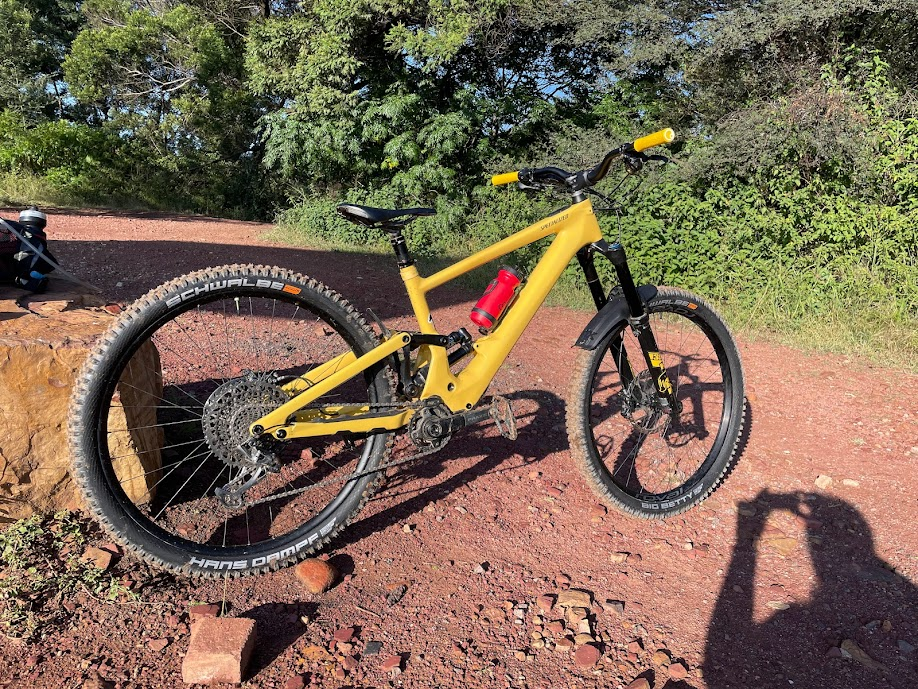
One year living with a Kenevo SL

I bought my Kenevo SL Expert in September 2022 after test riding a comp at the my local LBS, Lynwood Cyclery. Over the year I have made some changes however in general have been very happy with what I have since moving from a 2022 Levo SL.

The items I have changed are:
1. Brakes, well got rid of the 1.8mm stock rotors and changed them for the HS2’s which are 2mm rotors. That was a big change alone, the changing of the pads was the other moment. Have some RSC levers on the way, which I only really want so that I can change the bite point as the pads wear out. I found I have to change my pads at around 500km with 2mm of material left which sorta sucks.

2. Handlebar to a 50mm Burgtec Josh Bryceland bars cut to 780mm. These alone made me so much more at home on the bike due to the effective change in stack height that on the first day out I set PR’s on every stage at the Grootfontein Bike Park.

3. Grips to Ergon GA2’s in Yellow. In hindsight not the best choice, as they are not easy to keep looking yellow. The grips themselves are amazing at removing handpump.

4. Change to Schwalbe tires. I had to send my Butchers in for warranty as I had ripped most of the side knobs at less than 500km and I am by no means an aggressive rider. One thing I definitely noticed is these tyres are way quieter on the trail is they are so much quieter, and I can here when grip is changing.
Front is a Big Betty at 2,6” wide, terrain I ride does not really warrant the Magic Mary. The amount of front grip is quite crazy, although that could also be due to the step up from 2,4”
Hans Damph in the back 2,4”. The difference in rolling speed is so worth is and again this tire is grippy when needed and is easy to make it loose grip when you want it to for those style points 😁

5. Rear wheel to a 32 spoke as I kept breaking spokes on the 28 spoke. the hub is a high engagement from ZERO HUB REAR SL6.0. The best part of this hub is it is nearly silent. Paired with the quite tyres life is good.

Pros:
– Adjustable geometry. Only messed with the head tube angle.
When at +1 makes it feel like my 2022 StumpJumper.
At Neutral it is very much an all rounder
When set to -1 it is really a downhill monster, however does not quite the trails in my area as they tend to have very tight corners which I did not find comfortable on. However on a flow / jump line this was scary how hard it was to not just let go.
– Stable at speed, scarily so
– Components are for the most part good. I have made a few quality of life changes
– I feel like I am part of the bike, not the other way around. This was something I really did not like about my Levo SL 1.1 (Large) as I always felt like I was just sitting on top and just never felt in control.

Cons:
– Bike is long, switchbacks especially in the two slacker positions are really touch to get right.
– Stock rotors are rubbish. I was fortunate enough to be able to buy some SRAM HS2 rotors when I was in Germany and these made the brakes actually usable. I know everyone is always complaining about the SRAM brakes being terrible, however it is really down to the stock “consumables” not the Code RS, even my wife’s Code R’s work really well with the change in Rotor and pads

For those interested I have some riding videos on Youtube. Not talking to the view ones. YouTube Channel

Why it is bad to Mountain Bike in the wet

Disclaimer: was playing with some AI tools. Not written by a human, i.e. me.

If you love mountain biking, you might be tempted to try it in the mud. After all, it sounds like a fun and adventurous way to enjoy nature and get some exercise. But before you grab your bike and head to the nearest muddy trail, you should know why riding mountain bikes in the mud is a bad idea.

First of all, riding in the mud can damage your bike. The mud can clog up your gears, brakes, chain and suspension, making them less effective and more prone to wear and tear. The mud can also scratch your frame and components, reducing their lifespan and value. You will need to spend more time and money on cleaning and maintaining your bike if you ride in the mud.

Secondly, riding in the mud can be dangerous for you. The mud can make the trail slippery and unpredictable, increasing the risk of falling and injuring yourself. The mud can also splash into your eyes, mouth and nose, impairing your vision and breathing. The mud can also contain bacteria, parasites and toxins that can cause infections and illnesses. You will need to wear protective gear and wash yourself thoroughly after riding in the mud.

You should always follow trail park rules and if they are closed do not get upset with them, not like they control the weather. Some parks, e.g. Wolvespruit and Grootfontein Bike Parks, have sections where the rain does not affect them. Although those sections tend to be for more experienced riders it can be quite treacherous in the wet/mud

As you can see, riding mountain bikes in the mud is a bad idea. It can ruin your bike, endanger your health and damage the trail. Instead of riding in the mud, you should wait for the trail to dry up or find an alternative route. You will have a better experience and show respect to your bike, yourself and the environment.

Problems encountered setting up SCOM 2007 R2 in a lab

While setting up a SCOM 2007 deployment to do some testing from 2007 to 2012 I came across some annoying as F issues, this is what I did to clear the logs. If more pop up I shall append to this post.

The first hurdle with installing SCOM 2007 I came across was the default database not installing. The workaround is in the toolkit on the install disk/iso under SupportTools\AMD64\DBCreateWizard.exe . This will walk you through setup of the Database. Once that is done rerun the installation tool and you should be good to go.

The next bump in the road was what looked to be a common issue where you get a periodic event in the Operation Manger event log with ID 11464, even after I thought I had created the SCOM AD SCP correctly. For some reason the SDKServiceSCP was not being created. Creating that manually using ADSIEdit solved that WTF.

For some reason the permissions on the OperationsManager container where also screwed up, adding the SCOMAdmin group resolved that tidily.

Of course I had to remember to restart the HealthService (net stop HealthService && net start HealthService) each time otherwise you will wait around an hour to see if the error has been eradicated.

Customising actions on USB using USBDLM

There are many problems with USB in Windows. One being that every time you insert a drive it can have almost any drive letter, another running something automatically from the drive. Will discuss the second first:

Microsoft had Autorun for many years, since Windows 95, but they have had to nerf the hell out of it to stop the prevalence of virus’s and Trojan’s propagating using sneaker-net. A clever chap by the name of Uwe Sieber (http://www.uwe-sieber.de) has come to the rescue with USBDLM (USB Drive Letter Manager).

USBDLM is a Windows service that gives control over Windows’ drive letter assignment for USB drives. Running as service makes it independent of the logged on user’s privileges, so there is no need to give the users the privilege to change drive letters.
It automatically solves conflicts between USB drives and network or subst drives of the currently logged on user.
Furthermore you can define new default letters for USB drives and much more.

On my flash drive I have a TrueCrypt install with a 4GB container for my documents and wanted it to mount automagically whenever that drive is inserted into one of my computers. One of the features of USBDLM is to execute a command when a specific device is attached.

First things first, go fetch USBDLM ZIP file from http://www.uwe-sieber.de/usbdlm_e.html and unzip to a folder. I recommend using C:\Tools for this sort of stuff, makes backups easier. Once unzipped run the _install.cmd file as Administrator, if you are not logged on as an Administrator use the RunAs Administrator option in the context menu. To get started rename the USBDLM_sample.INI to USBDLM.INI, this file is read every time a device is inserted so no need to restart the service while testing.

To have the “Autorun” mount a TrueCrypt you will need a section like this one

[OnArrival20]
DeviceID1=USB\VID_125F&PID_312A9021000000000003637772282
FileExists=%drive%\MyTrueCryptFile.TC
open=”%drive%\TrueCrypt\TrueCrypt.exe” /q /v %drive%\MyTrueCryptFile.TC /letter N

To open an item on the drive you need to create an [OnArrival] section.
The DeviceID can be determined using the included ListUsbDrives_To_Notepad.cmd which will open a text file through which you can find the USB DevID for the USB device your Truecrypt file is on.
The FileExists portion is optional, use this to first check the file is actually on the device. The %drive% is a placeholder for whatever drive letter the USB device is mounted as.
The open portion is where you will put the command line to open whatever you want, here it is a TrueCrypt file.

Once my TrueCrypt container is mounted another OnArrival section opens my KeePass database. A really useful feature when you have applications automatically running is the OnRemovalRequest section which can then run the commands to un-mount the TrueCrypt volume after closing my KeePass database.

Another very useful feature of USBDLM is the initial purpose behind the service, the ability to enforce the assignment of USB drives to specific drive letters. This is done thusly

[DriveLetters]
Letters=F,G,H,I,-

[DriveLetters10]
DeviceID1=USB\VID_125F&PID_312A9021000000000003637772282
Letters=A

This is far simpler, [DriverLetters] defines what letters are available to be assigned to USB drives.

[DriveLetters10] is a bit more complex, a very small bit. Using this example it will assign the drive letter A whenever the device with DeviceIS1 is attached.

There are lots of additional things you can do, all well documented in the help file included with the download.